Posts

Cannot Open a PDF File - Causes and Resolution

There are different factors can be involved that prevent PDF file to open. Some factors include an out-dated version of Adobe Reader, damage to the Reader, damage to the PDF file, unrecognizable file type, PDF file is created with non-Adobe program, or no PDF reader is installed. Here are the solutions of all described causes that prevent PDF file to open. No PDF reader is installed: Before moving further first ensure that a PDF reader is installed on your computer. Problem with Adobe or Operating System: If you have seen that a PDF reader is installed, then there is possibility that Adobe Reader is not up to date or it is damaged. Follow these steps to make sure that Adobe Reader is up to date and it is not damaged: Update Adobe Reader. Repair Reader. Reinstall using latest version. Make sure that operating system can recognize PDFs.
How to Fix QuickBooks Error -6177, 0

QuickBooks software is one of the most popular accounting software in the World. But, when it does not work properly and showing any error, it's seems like so difficult to deal with it. The reason behind errors in QuickBooks software are networking issues, corrupted data files, running an old edition of the software, improper installation of the software, firewall issues, or anymore. From my point of view, every QuickBooks user should always have a daily backup of a QuickBooks data file. So that, if your file becomes corrupted or showing any error while trying to open it, then you could restore it from the previous day's backup. When you open QuickBooks company file, you will see this error message: “QuickBooks is attempting to open this Company file. Before you can open the company file from your computer you must first open the company file on the computer where the company file is located. (-6177, 0)”

Difference between File Extensions Used in QuickBooks

Did you know that there are more than 30 different file extensions in QuickBooks? QuickBooks uses different file extensions for each file type to store data and each file type has its place. There are different file extensions for everything from QuickBooks working files and Accountant files to Payroll files and Loan Manager Files. It uses different folders to separate different types of data. QuickBooks data file (.qbw) and QuickBooks backup file (.qbb) is the only two main company files used in QuickBooks for Windows. But, there are three more important file extensions used for holding transactions and a data for QuickBooks Company file; QuickBooks portable company file (.qbm), Accountant’s copy export file (.qbx) and Accountant's copy working file (.qba).

How to Remove Unwanted Lines in Word 2007, 2010, and 2013

For some reasons, unwanted lines occasionally appear in Microsoft Word and it is very difficult to delete. You cannot click on it, you cannot delete it and even when you select all and press delete, it will back again and your every effort will become useless. These lines can be Gridlines, Drawinglines, Footnotes, Vertical lines, Horizontal lines, Borders or else. It can be also occur when you copy and paste texts from unsupported file type or online. Here I will explain that how you can remove these unexpected or unwanted lines from Microsoft Word 2007, 2010 and 2013. Remove unwanted Borders from Word Document: The most upsetting lines in Word documents appear to be paragraph and page borders. These paragraphs borders can appear if the “automatic border” option is enabled in AutoCorrect. You can easily remove this by selecting these lines and pressing the Delete key but sometimes it does not work.

Excel Tip: Work Faster in Excel with these wonderful Keyboard Shortcuts

The amazing thing about the keyword shortcuts is that you can do most of the things in Excel without using Mouse. While working with massive sheets of data and creating super-detailed reports in Microsoft Excel, I have found that switching from typing on keyboard to using mouse is the most time-consuming part of using MS Excel. It breaks flow and adds extra time to finish the work. So I have learned some keyboard shortcuts that make working with Excel a little bit easier and faster. Here are a few tips and tricks to utilizing keyboard shortcuts in Excel that speed-up your work.

QuickBooks for Mac 2014 Gives You Many Reasons to Upgrade

Image
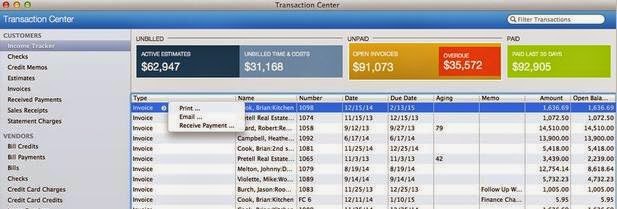
Most of the Accountants choose QuickBooks Mac for a diversity of reasons and the major one being its simplicity and usability. In previous version of QuickBooks for Mac 2014, Intuit had added some new import features, the option to attach external documents, and the addition of the Intuit Payment Network. Now, QuickBooks for Mac 2014 allows bookkeepers and business owners to create invoices, bill time, track sales, expenses and payroll quickly. QuickBooks software is more than 20 years old now and hundred of new features have been added over the years to its Windows versions and Mac versions. It contains numerous valuable new and improved features for accountants and their clients.

MS Excel Functions: Frequently Used Mathematical and Text Formulas in Excel

Image
Formula is one of the most important features of Excel, which allow you to perform different kind of operations in its cell content. It helps when you are stuck on data and need to get done your task quickly. Microsoft Excel offers over 300 functions to let you do much more in your spreadsheet once you master them. In this article; you will learn about frequently used formulas in Mathematical and Text function categories.